Structured CAD tree visualization

Turn complex CAD data into a clear visual tree.

iTreeView is an application that extracts properties from models and displays them in a structured tree view, helping users understand assemblies, relationships, and component data faster.
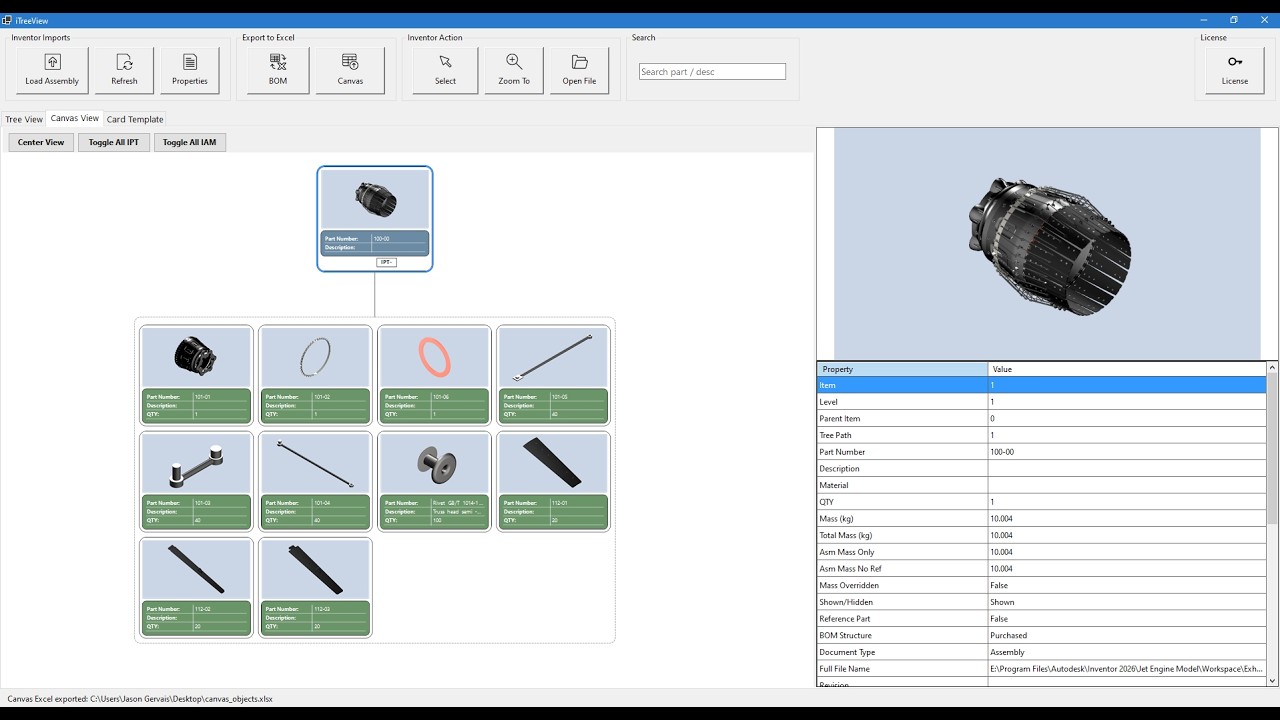
iTreeView Demo Video

Download

Get iTreeView

Download the latest version of iTreeView and start exploring your CAD assemblies visually.

iTreeView v1.0.0

Released: March 27, 2026

Download

Release Notes

  • Initial public release
  • Structured CAD tree visualization
  • Canvas view with customizable templates
  • Export BOM and canvas to Excel
  • CAD component selection and zoom tools

Overview

What iTreeView does

iTreeView extracts properties from CAD models and displays them in a structured tree view so engineers can review assemblies, locate components, and generate documentation more efficiently.

Structured data extraction

Pulls useful component data into an organized and readable tree.

Visual assembly understanding

Shows parent-child relationships in a clear graphical format.

Documentation tools

Exports BOM and canvas information into formats that are easier to share.

Feature Overview

Core application functions

Built to simplify CAD assembly review, property extraction, and communication.

Inventor Imports

Load from Open IAM

  • Connects to the currently open CAD assembly.
  • Extracts assembly structure and component properties.
  • Builds the initial tree structure used by iTreeView.

Refresh

  • Re-reads the CAD assembly and updates the tree.

Properties

  • Allows the user to select the properties to extract from CAD.
  • Metadata can include: Part Number, Description, Material, Quantity, Mass, Assembly Mass (with/without reference), Mass Overridden (yes/no), Assembly Relationships, Custom Properties.

Note: Some properties may not work as expected.

Inventor Actions

Select in CAD

  • Highlights the selected component directly in the CAD model.
  • Helps quickly locate parts within large assemblies.

Zoom to Component

  • Automatically zooms the CAD view to the selected component.

Open File

  • Opens the source part or subassembly file in CAD.
Export Tools

Export BOM to Excel

  • Exports the TreeView BOM with all selected properties to Excel.

Export Canvas Image

  • Generates a copy of the Canvas Tree View into Excel.
  • Includes all selected properties from the template tab.
Search

Search Box

  • Instantly locate parts by part number, description, or name.
  • Highlights matching components in the tree.
Canvas View

The main canvas displays the assembly structure as an intuitive visual tree where assemblies appear as parent nodes and subassemblies and parts branch underneath.

Each node contains:

  • Component Image
  • Selected Properties

This allows engineers to understand complex assemblies at a glance.

Card Templates

Card Templates Tab

  • Customize the visual appearance of nodes in the Canvas View.
  • Modify colors and displayed properties for each card.
  • Control how component data is presented in the visual tree.

Allows users to tailor the canvas display to match internal standards and preferences.

Key Benefits
  • Quickly visualize complex CAD assemblies
  • Extract structured data from CAD models
  • Generate documentation instantly
  • Improve design reviews and collaboration
Demo Mode Limits

The demo version of iTreeView allows you to explore core functionality with limited assembly size:

  • Maximum 2 top-level parts
  • Maximum 2 top-level subassemblies
  • Maximum 2 parts inside each top-level subassembly

Upgrade to the full version to remove all limitations and analyze complete assemblies.

Screenshots

See iTreeView in action

Scroll through the screenshots below. Click any image to view it larger.

Contact

Get in touch

For inquiries reach out directly via email.

jpg.ceo1@gmail.com
```